New Features
-
New
Pick a call back up after its interaction was closed — If an interaction was closed while the caller is still on the line (for example, after the wrong member was opened), opening the correct member from your core now offers to pick the call back up. The Portal shows who closed it, when, and which member it was attached to. Choose Yes to continue the call with the member you opened. The closed interaction keeps its own history.
-
New
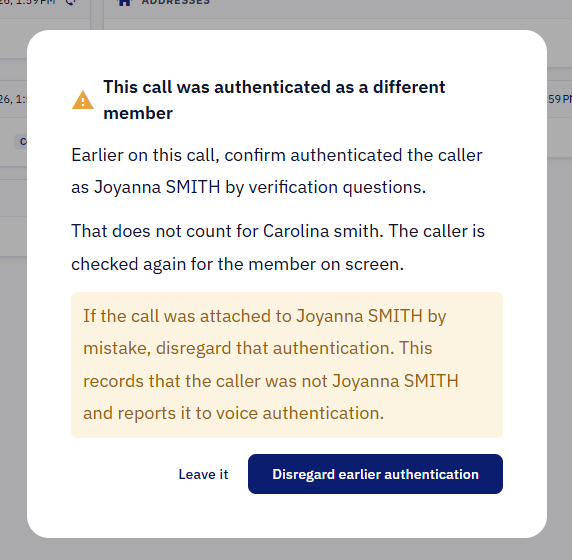
See and disregard an authentication made against a different member — If a call was authenticated while attached to a different member, the top bar now shows who authenticated it and against which member, and the Portal warns you once when you open the call. From that warning you can Disregard the earlier authentication. This withdraws the voice, one-time code and questions results recorded for that member on the call, and removes their “Fully Authenticated” status on all of their calls, just like Reject caller voice.
Improvements
-
Improved
Confirmation before attaching a waiting call to a member — When you accept a waiting call while a member is open, the Portal now asks before attaching the call to that member, and warns you when the caller’s number isn’t on the member’s record. In that case the safe choice, accepting the call without a member, is the main button.
-
Improved
Voice authentication stays with one member per call — A caller’s voice is now checked against one member only: the first member the call was evaluated for. If the call is later attached to a different member, the Portal tells you voice authentication isn’t available on this call and to verify the member with questions or a one-time code. Those verifications work as usual.
Bug Fixes
-
Fixed
Authenticate opened a different member — Clicking Authenticate from your core could open a different member when the call was already attached to someone else, such as the other owner of a joint account. The Portal now always opens the member you selected. If another rep already has the call, you see the member you opened and a notice saying who has the call.
-
Fixed
Authentication results shown for the wrong member — After a call was moved to a different member, the authentication earned against the first member could still appear for the second. Each member now gets their own fresh evaluation.